See who at the client reads your benefits offer.
anymail is an email platform for outreach and offers. A company that sells employee benefits sends its offer as a tracked link and sees which people at the client open it, which pages they read and when someone from finance or the board joins. Every visit counts toward one temperature per company.
14 days with every feature. No card. Seats and mailboxes are unlimited.
Illustration with an example company and values. Three people are deciding.
Illustration with example companies and values.
After HR asks for an offer
HR asks for the offer. Finance and the board decide.
The offer usually leaves as a PDF attachment with the client's name on the cover. Then HR takes it to finance and the board, and the conversation moves to people you have never emailed.
Who reads a benefits offer
Several people decide, and you see each of them
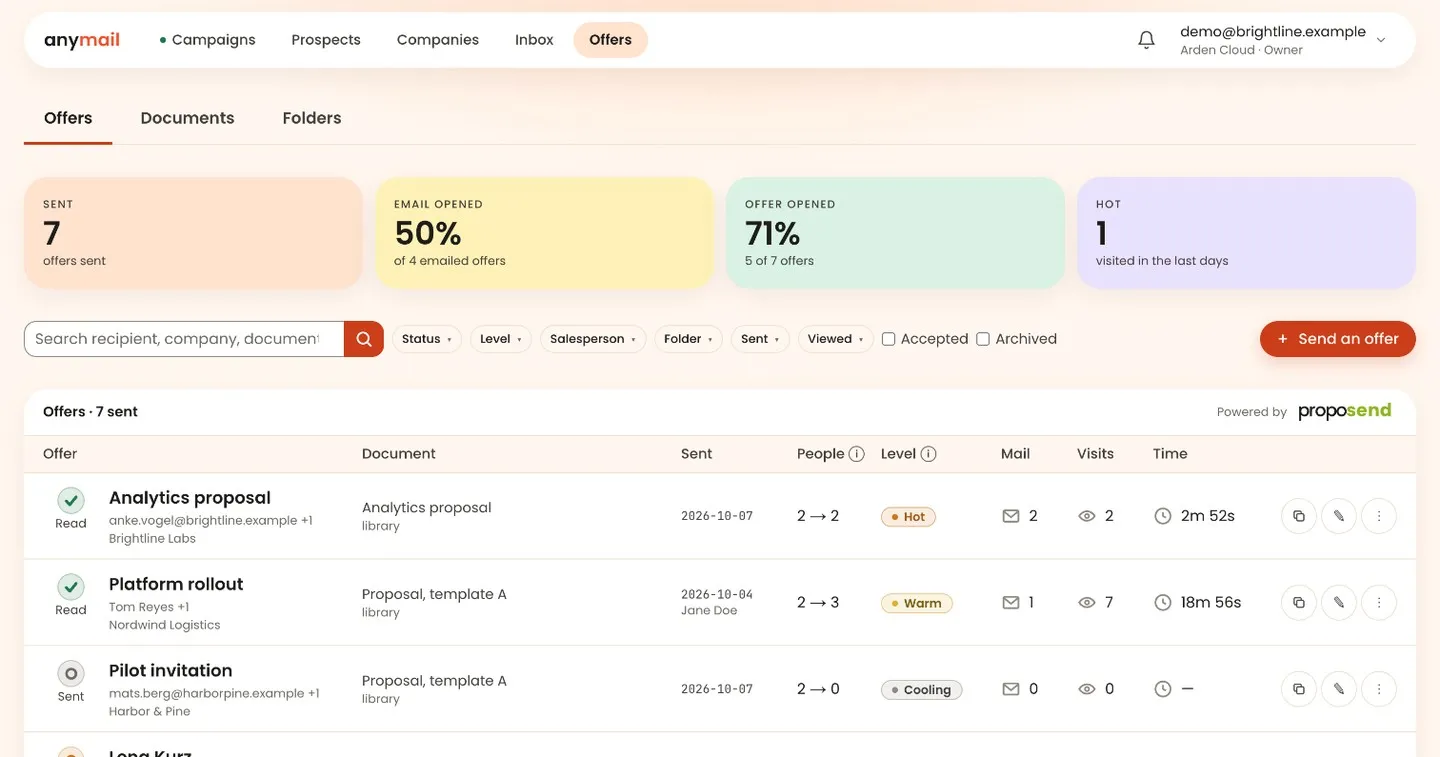
A benefits offer rarely stays with one reader. Each person who opens your link appears at the same company, with the pages they read.
| Reader at the client | What they often check | What you see in anymail |
|---|---|---|
| HR or benefits manager | The catalogue of benefits and how employees choose | The first visit, reading time per page and every return |
| Finance director | The price per employee and the co-funding model | A new person at the company after the offer is forwarded |
| CEO or board member | The total cost and the start date | Another new person, and which pages they opened |
| Whole company | One decision | One temperature that adds up every visit, click and reply |
The roles and what they check are typical examples, not data from anymail customers.
Keep your offer template
Upload the PDF you already send
Your offer stays as it is. Upload the PDF or deck, and anymail turns it into a personal link for each client that it can measure page by page. Every visit counts toward the company temperature, next to clicks and replies.
- Counts mostA reply with positive intent
- Counts moreThe offer forwarded to a new person, a return visit to the offer, a reply
- CountsA first visit to the offer, a click
- Not countedEmail opens
Temperature counts the last 28 days, and each event loses half its weight every 4 days, so an offer that went quiet drops down the list on its own.
Reading time per page of one offer
Example of a six-page benefits offer: overview, catalogue, co-funding, price per employee, start date, contact.
Illustration with example values.
Who it is for
Built for teams that sell benefits to companies
Benefit platforms, sports cards, voucher and recognition programmes: B2B teams that send many offers to HR departments.
Sales reps
Call the offers that are moving
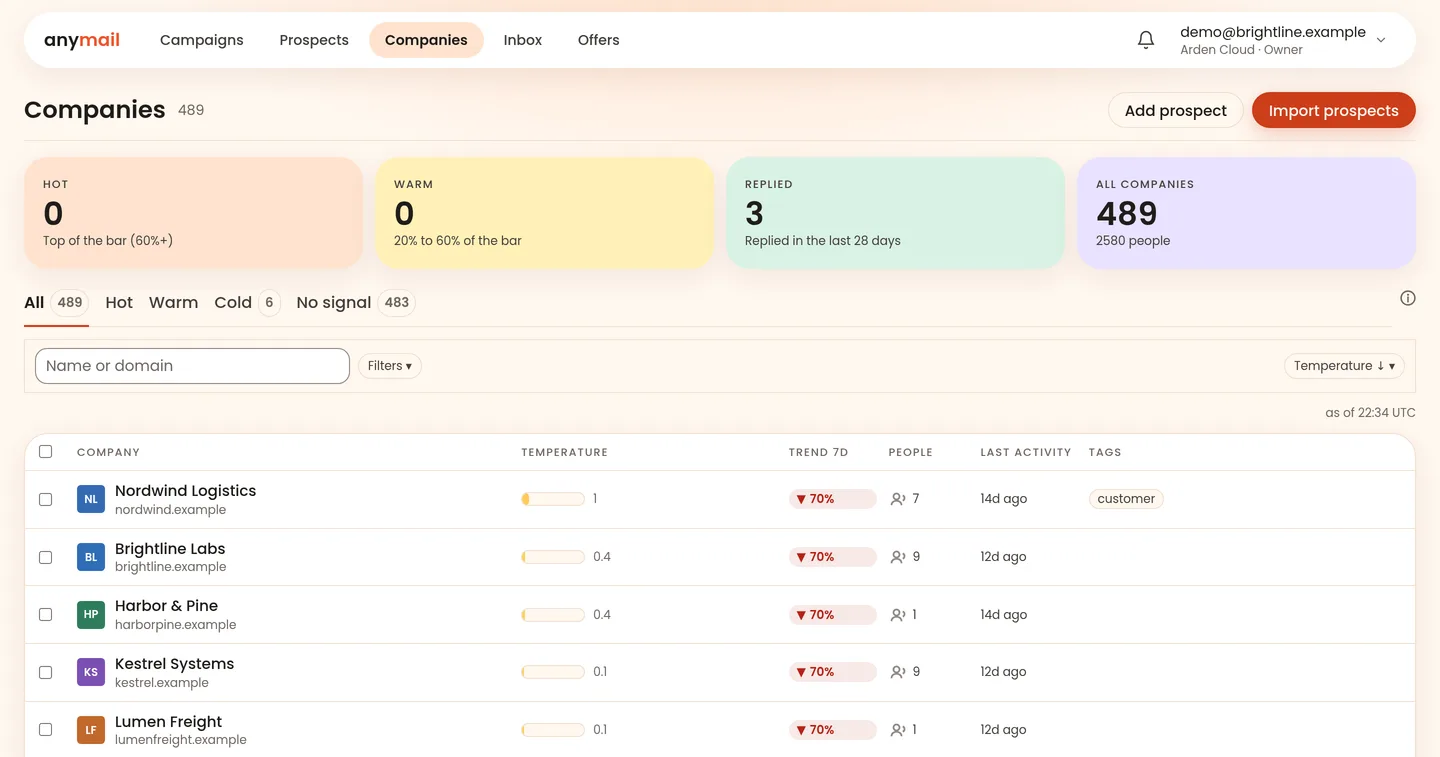
Open offers sit on one list sorted by temperature. Start the day with the company at the top.
Account managers
Know when the client comes back
An email tells you when a quiet offer gets a new visit, so you call while it is open on their screen.
Sales managers
One view across the whole team
Seats and mailboxes are unlimited, so every rep's offers and replies add up on the same companies.
In the app
Your offers, in anymail
Open a company to see the people who read the offer, the pages they opened and their replies. Push warm accounts to your CRM through 20+ integrations, a REST API, signed webhooks or the MCP server.
Get started
From trial to your first tracked offer
Book a call if you want us to walk you through your first offer.
Start the trial
14 days with every feature. No card.
Connect your mailboxes
Gmail through an app password, Microsoft 365 or any SMTP and IMAP account. anymail checks SPF, DKIM and DMARC per domain.
Upload your offer
Use the PDF or deck you already send to clients.
Send a personal link
Each client gets its own link, so every visit lands on the right company.
Open the list
Companies are sorted by temperature. Call the one at the top.
Frequently asked questions
How do I know who at the client read our benefits offer?
Send the offer as a tracked link from anymail. Each person who opens it shows up at the client company with reading time per page, and a forward to someone new appears as a new person at the same company.
Is anymail for offers to private customers?
No. anymail is built for offers to companies. Temperature adds up the people at one company, so it needs a company on the other side.
Can we keep our PDF offer template?
Yes. Upload the PDF or deck you already use, and anymail turns it into a link it can measure page by page. The conversion uses AI that calls DeepSeek outside the EEA. The Security page lists exactly what is sent.
Do we get an alert when the client opens the offer?
Yes. anymail emails you when an offer turns Hot, when someone comes back to it after a quiet spell, with a summary of each visit and a daily digest.
Does anymail find HR contacts for us?
No. You bring your own list as a CSV file or through a connector such as Apollo, FullEnrich or Hunter. anymail verifies the addresses before sending.
Does it work on LinkedIn?
No. anymail sends email. LinkedIn automation is outside the product.
What does a sales team pay?
The price depends on one number, the people you contact each month, from $30.80 a month for 500 people. Seats and mailboxes are unlimited, and the API and integrations are included in every plan. Prices in USD. See Pricing.
Can it update our CRM?
Yes. Every plan includes 20+ integrations, a REST API, signed webhooks and an MCP server, so a reply or an offer visit can reach your CRM. See Integrations.