Send to catch-all domains in a small separate batch
Find the catch-all domains on your list, test them with a small batch and decide once per domain.
Continue for free
Enter your email to open this lesson. You stay signed in for 7 days on this device.
What to set
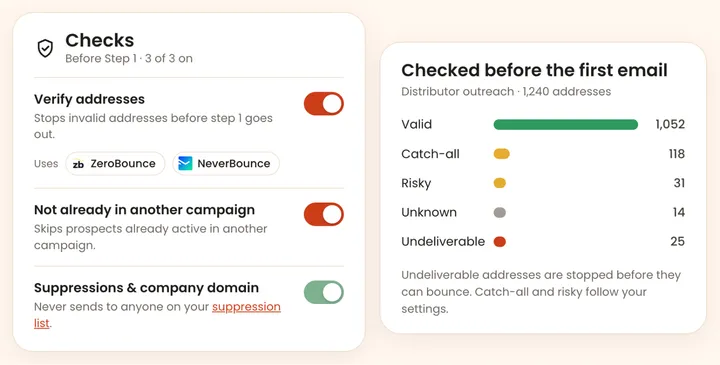
- Verify the whole list and read the status column before anything is sent. With ZeroBounce or NeverBounce connected, this runs on import.
- Move catch-all addresses into their own campaign or segment, so their bounces stay visible.
- Send to addresses found on the company's own site or confirmed by an earlier reply. Hold addresses guessed from a name pattern until you find a source.
- Send a first batch of a few dozen messages and read the hard bounce rate.
- If hard bounces stay low, send the next batch. If they climb, stop and suppress what bounced.
Why it matters
A catch-all server accepts mail for every address at its domain, so a verifier gets the same answer for a real mailbox and an invented one. The server may accept a message and then find no mailbox inside. You get a late bounce or nothing at all, and silence is worse because your reply count shows no sign of it.
Watch out for
- A risk grade is an estimate. It ranks addresses by likelihood and confirms none of them.
- A new domain, or one with a recent bounce problem, should leave catch-all addresses out until its rate is stable.
- In anymail, the default Catch-all verification setting is None, which sends to every catch-all address.
Good practice
- Decide once per domain. Thirty people at one company are one decision.
- Measure the share of catch-all addresses on your own list, since it varies by industry and company size.
- Read catch-all as a fact about the server. It says nothing about the person.
Jane's verification flags Harbor & Pine and Brenner Lab as catch-all. The Brenner Lab address comes from its own team page, so it goes in the first batch. A guessed address at Harbor & Pine waits for a source.
Go deeper: What is a catch-all domain, and should you send cold email to one?