Score each company's temperature from what its people do
Add up weighted events from everyone at a company, let old events fade and follow up with the warmest first.
Continue for free
Enter your email to open this lesson. You stay signed in for 7 days on this device.
What to set
- Group every contact under a company on import.
- Send one sequence with company-level stop rules, so a reply from one person pauses the others.
- Weight each event. A positive reply weighs most, then another reply, then a click. Bounces and unsubscribes count down, and opens count nothing.
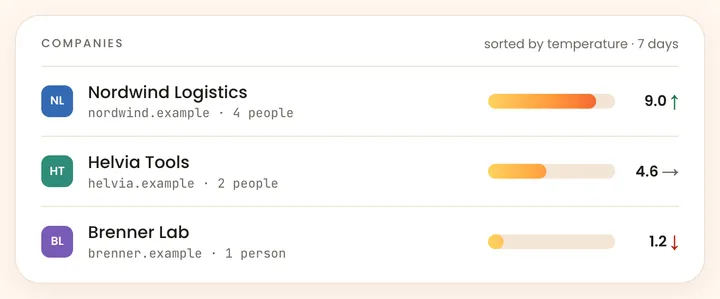
- Halve each event's weight every 4 days, drop events older than 28 days and add up everyone at the company into one score from 0 to 10.
- Sort by score: 6 or more is Hot, 2 or more is Warm and below 2 is Cold. No events reads as No signal.
- Check the person and date behind each warm score, then follow up by hand.
Why it matters
Account-based cold email follows the company. A click from a junior contact and a reply from a manager belong to the same story. The score turns that story into a number you can sort by, and every number comes from your own sending.
Watch out for
- A temperature measures reaction to your emails. A quiet company may simply be busy.
- One click is one data point. Wait for a pattern, such as two people from one company active in the same week.
- Security scanners can add clicks. Filter clicks that arrive seconds after the send.
Good practice
- Read No signal as missing data, because that company never reacted to anything.
- Trust the order of the weights more than the exact figures. A reply outranks a click.
- Let a quiet company cool down by itself.
At Brightline Labs, one person clicked two days ago and another sent a positive reply today. With anymail's current weights, today's positive reply counts 5 and the two-day-old click about 1.4, so Brightline Labs scores about 6.4 and gets Jane's first call.
Go deeper: What is account-based cold email, and how do you score a company's temperature?