Add follow-ups, delays and A/B variants
Turn one email into a sequence and test one change at a time.
Continue for free
Enter your email to open this lesson. You stay signed in for 7 days on this device.
What to set
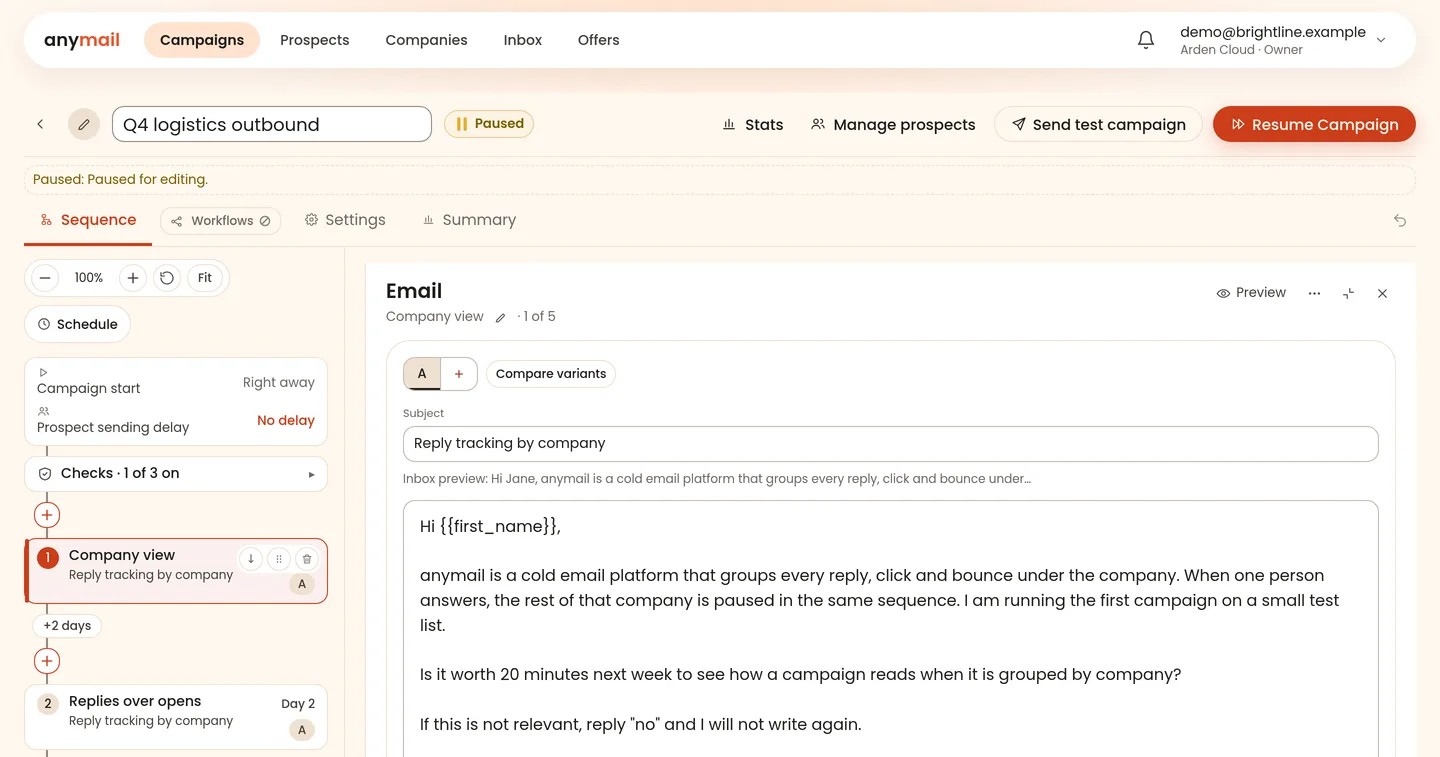
- Press the plus button below the first email and add another Email step.
- Click the delay chip between two steps, such as +3 days, and set the number of days.
- Leave the subject of a follow-up blank to send it in the same thread as the previous email.
- To test a change, press the plus button next to variant A. The new variant starts as a copy of the first. A step can hold up to four: A, B, C and D.
- Change one thing per variant, such as the subject or the opening line.
Why it matters
Most replies arrive after the first email, so the follow-ups carry much of the result. In Belkins data from 2025, 58.6% of replies came from follow-ups. A follow-up in the same thread shows the earlier message under it, which gives the reader context without repeating it.
Watch out for
- The first step always sends with no delay.
- The Count week days only setting decides whether delays skip weekends.
- A variant needs enough sends to mean anything. With a small list, test one big change.
Good practice
- Bring a new angle into every follow-up: a case, a number, a short question.
- Space follow-ups three to five days apart.
- Stop after three to five emails, and let the last one close the loop politely.
In the demo workspace
Jane adds a follow-up three days after the intro, with a blank subject and one new angle about delivery windows. She also adds variant B to the intro with a different subject line.